WANNA LEARN MUSIC PRODUCTION?
STRUGGLING TO FINISH A TRACK? A LOW END THAT NEVER GLUES, A MIX THAT NEVER FEELS FINAL, OR SIMPLY THE WISH TO TAKE YOUR KNOWLEDGE FURTHER?
PRODUCTS / SYNTH
KICK ENGINE
A KICK DRUM SYNTH WHERE EVERYTHING IS A SINE. DRAW THE PITCH, THE BODY AND THE CLICK, OR IMPORT A KICK AND REBUILD IT FROM THE INSIDE.
SPECIFICATIONS
- FORMATS
- AU + VST3 (macOS), VST3 (Windows), standalone app on both
- SYSTEM
- macOS 11 or later (Apple Silicon and Intel, universal binary) · Windows 10 or later, 64-bit
- HOSTS
- Logic Pro, Ableton Live, FL Studio, Cubase, Studio One, Bitwig
- LICENSE
- Activate on up to 3 machines, manage in your account
- INCLUDED
- Factory presets, 11 factory clicks, PDF manual
HOW IT WORKS
Drag a WAV, AIFF or FLAC onto the window, straight from your DAW or from Splice. Kick Engine reads the kick and asks how you want to take it apart.
Choose how the kick is rebuilt.
SAMPLE: the sub becomes pitch and amp curves, and everything above the crossover plays as the click sample. SYNTHESIS: one oscillator rebuilds the whole kick, click included, in stereo. An exact copy, with nothing left as a sample. Either way the kick is measured one cycle at a time and rebuilt as curves, phase-locked to the original. You can switch between the two at any time.
In SYNTHESIS, the attack is yours to draw.
Press DRAW and the editor zooms in on the first milliseconds. Drag over the waveform: what you draw is what plays. Five tools in the pen, complex, smooth, eraser, fade and glue. Save the click to your own library.
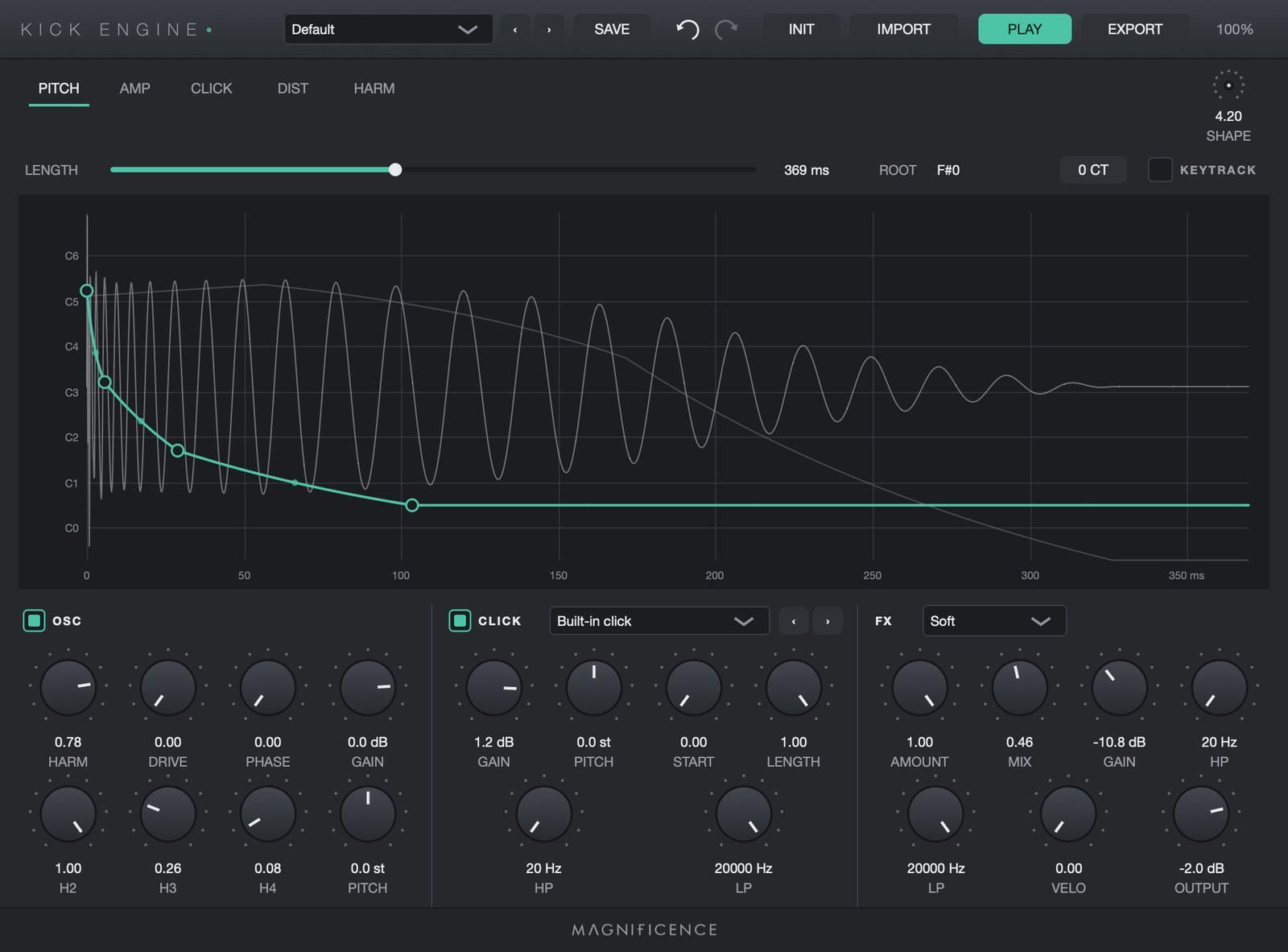
Set the body note. Draw the sweep.
Straight lines between points. Bend any segment with its handle. The last point holds, so the body never drifts.
Draw the AMP for the right kick shape.
Pull the LENGTH in for a tight club kick, or extend and re-shape with the AMP. PUNCH, BODY and TAIL each have their own level. Every MIDI pattern is identical, at any tempo.
INIT gives you one sine and an empty click: draw the whole kick yourself. Click EXPORT to save a WAV, or drag the button straight onto a track in your DAW. Every hit is identical, so what you export is what you played.
TRY IT FIRST
14 DAYS, FREE
INSTALL, OPEN THE PLUG-IN, CLICK 'ACTIVATE ONLINE' AND START YOUR TRIAL WITH A FREE ACCOUNT. NO PAYMENT DETAILS NEEDED.
FEATURES
Pitch, amp, click, distortion and harmonics are all editable curves on one timeline. Straight lines between points, bend any segment with its handle.
Drop a WAV on the window. The sub is measured cycle by cycle and becomes the pitch and amp curves, phase-locked to the original. What is left, the top, lands in the click layer. OSC + CLICK reproduce the sample; now tune, stretch and reshape it.
Lock a point and the waveform after it stays identical no matter what you change before it. Every hit is bit-identical, also in a fast MIDI pattern.
Eleven factory clicks, your own click library, or the top of an imported kick. Pitch, start, length and filters per click.
Distortion (soft, hard, tube, fold, analog) with its own HP, LP and MIX: filter the distorted signal and blend it into the clean kick. A SHAPE tilt around 800 Hz, and LOW CUT and HIGH CUT on the whole kick with slopes up to 36 dB per octave. Oversampled, resets per note.
Presets with categories, undo/redo, ms-locked curves when you change the length, zoom and pan, GUI size 50 to 150 percent, drag-to-DAW export.
VERSIONS AND RELEASE NOTES
CURRENT VERSION: 1.0.4. THE PLUG-IN SHOWS THE VERSION YOU ARE RUNNING BOTTOM-LEFT. EVERY EARLIER VERSION STAYS AVAILABLE: TO GO BACK, RUN THE OLDER INSTALLER OVER THE CURRENT ONE. YOUR PRESETS AND LICENSE STAY WHERE THEY ARE. KICKS SAVED IN A NEWER VERSION MAY SOUND DIFFERENT IN AN OLDER ONE. ON MACOS, 1.0.0 TO 1.0.2 NEED MACOS 13 OR LATER.
VERSION 1.0.4 CURRENT 10 NOV 2026+
- Synthesis: import a kick and the oscillator becomes the kick. It plays the whole kick itself, cycle by cycle, click included. Edit pitch and amp like any other kick; pitch the body and the click stays in place. Switch between SAMPLE and SYNTHESIS at any time.
- Draw: zoom in on the first milliseconds and draw the click's waveform by hand, with brush, eraser, fade and glue tools. Save your clicks to your own library.
- A curve for every knob: click a knob and draw its movement over the kick. Curves live in the preset.
- ATTACK, PUNCH, BODY and TAIL: each part of the kick has its own level, as faders next to SHAPE and as handles above the waveform.
- LOW CUT and HIGH CUT on the whole kick: one range fader, slopes from 12 to 36 dB per octave (right-click a handle), each with its own curve.
- FX: a new Analog type with optional noise. HP and LP now filter the FX signal only, before MIX: distort hard, keep just the highs and blend them into the clean kick. Switching FX types no longer clicks.
- KEYTRACK bar: on-screen keyboard, pitch bend, LEGATO and GLIDE. 'Keytrack from here' on a pitch point keeps the thump and lets only the tail follow the key.
- Retriggering is click-free: the previous kick fades out in 12 ms while the new one starts.
- Editor: zoom down to half a millisecond, LIN or LOG time axis, copy and paste points, type exact values, simplify a curve, and a help text on every control (the ? in the header).
- SHAPE is a flat tilt around 800 Hz, DRIVE is gentler, INIT is one sine on C1.
- macOS: runs on macOS 11 Big Sur and later. Windows: fixes activation on machines that could not be identified.
- Your presets and projects: everything you made in 1.0.0 to 1.0.3 opens in 1.0.4 and keeps its sound; those kicks keep the old SHAPE, DRIVE and FX band behaviour. New kicks use the new behaviour. This is a big update, so a setting can respond slightly differently in rare cases: update between projects, not in the middle of one. Every earlier version stays available below.
VERSION 1.0.3 21 OCT 2026+
- Windows: drag and drop into the plug-in now works from inside your DAW and from Splice.
- Fixed: the PLAY button could lock your DAW's space bar while the plug-in window was in front.
- A failed import now shows a message in the footer.
- 9 Nov: macOS installer rebuilt so the plug-in also loads on macOS 11 Big Sur (Intel and Apple Silicon). Same version, nothing else changed.
VERSION 1.0.2 19 OCT 2026+
- Fixes a rare case where stepping through the clicks while a note was playing could leave the DAW silent until restart.
- The running version is shown bottom-left in the plug-in.
VERSION 1.0.1 12 OCT 2026+
- The 'Magnificence Kicks' factory presets now carry their click audio, so they sound the same on every machine.